# How to Transfer Money from ICICI Bank to GIFT City - Step-by-Step Guide
Author: Ankur Choudhary
Author URL: https://getbelong.com/blog/author/ankur-choudhary/
Published: 2026-01-13
Category: GIFT City Guide
Category URL: https://getbelong.com/blog/category/gift-city-guide/
Meta Title: Transfer Money from ICICI Bank to GIFT City | NRI Guide
Meta Description: Step-by-step guide to transfer funds from ICICI Bank to GIFT City using Money2World. Screenshots, fees, and tips for NRIs.
Tags: Banks, Gift City Guide
Tag URLs: Banks (https://getbelong.com/blog/tag/banks/), Gift City Guide (https://getbelong.com/blog/tag/gift-city-guide/)
URL: https://getbelong.com/blog/transfer-money-from-icici-bank-to-gift-city/
You've done your homework on [GIFT City investments](https://getbelong.com/blog/nri-investment-gift-city/). The tax-free USD fixed deposits look appealing. But now you're staring at your ICICI Bank app, wondering: "How exactly do I get my money there?"
If you have an ICICI Bank account, the process is simpler than you think.
Their Money2World feature lets you transfer funds to your [GIFT City FD account](https://getbelong.com/blog/nri-fixed-deposits-in-gift-city/) directly from your phone. No branch visits. No physical paperwork. Just a few taps and your money is on its way to earning [tax-free returns in USD](https://getbelong.com/blog/gift-city-tax-benefits/).
Many NRIs in our WhatsApp community had questions about this exact process. This guide walks you through each step with real screenshots from the iMobile app.
## **What You'll Need Before Starting**
Gather these items before you begin:
- **iMobile Pay app** (latest version) or ICICI Internet Banking access
- **Active ICICI Bank account** (Savings, NRE, or NRO)
- **Your GIFT City bank account details** including account number, SWIFT code, and branch address
- **PAN card linked** to your ICICI account
- **Registered mobile number** for OTP verification
👉 **Tip:** Don't have a GIFT City account yet? [Belong](https://getbelong.com/) can help you open one with partner banks like RBL, ICICI GIFT City, or Axis Bank GIFT City. Our app handles the paperwork digitally from anywhere in the world.
## **Understanding ICICI Bank's Money2World Feature**
Money2World is ICICI Bank's outward remittance platform. It operates under RBI's [Liberalised Remittance Scheme (LRS)](https://getbelong.com/blog/rbi-rules-nri-investment/), which allows resident Indians to transfer up to USD 250,000 per financial year for permitted purposes.
Here's why ICICI's platform works well for GIFT City transfers:
Feature
Details
Availability
24/7 through iMobile app
Transaction Limit
Up to USD 75,000 per transaction
Currencies
21 currencies including USD
Tracking
Real-time SWIFT GPI tracking
For NRIs transferring from an NRE account, there's no upper limit. From NRO accounts, you can transfer up to USD 1 million per financial year with proper documentation. ( [Source: ICICI Bank](https://www.icicibank.com/personal-banking/online-services/funds-transfer/outward-remittance/online-transfer/internet-banking))
## **Step-by-Step: Transferring Money from ICICI Bank to GIFT City**
The process has two parts. First, you'll add your GIFT City account as a receiver. Then, you'll initiate the transfer. Adding the receiver is a one-time setup.
### **Part A: Setting Up the Transfer**
#### **Step 1: Open iMobile and Go to Send Money**
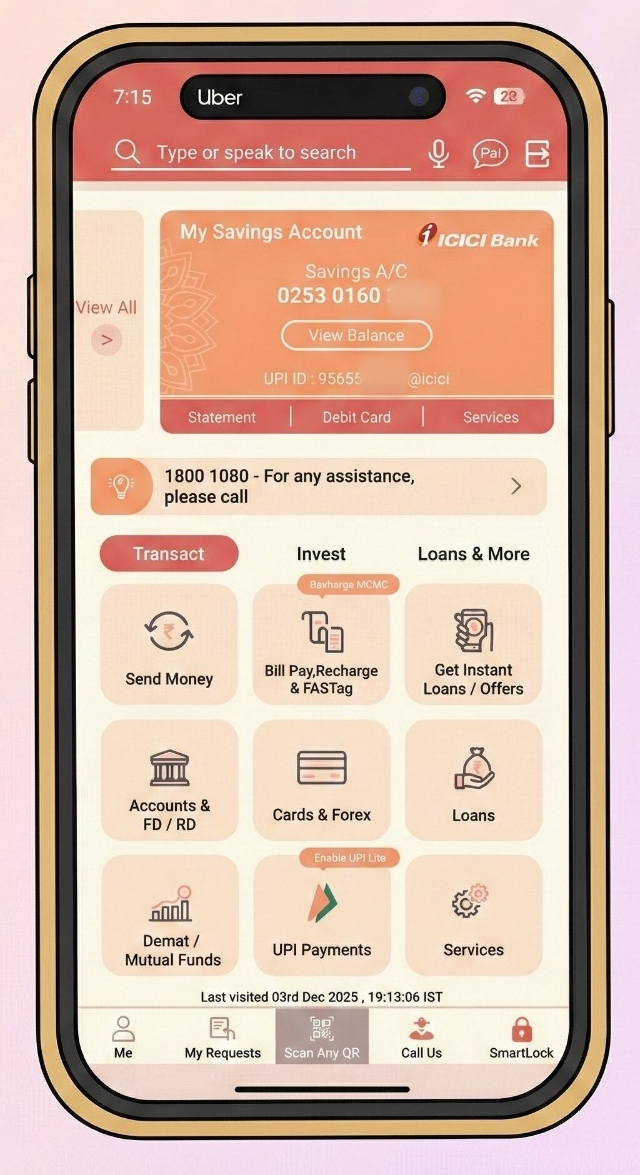
Log into your iMobile Pay app. On the home screen, you'll see various options. Tap on **'Send Money'** under the Transact section.
This opens ICICI's payment options. You can see recent transactions, manage payees, and access the overseas transfer feature.
#### **Step 2: Select Transfer Overseas**
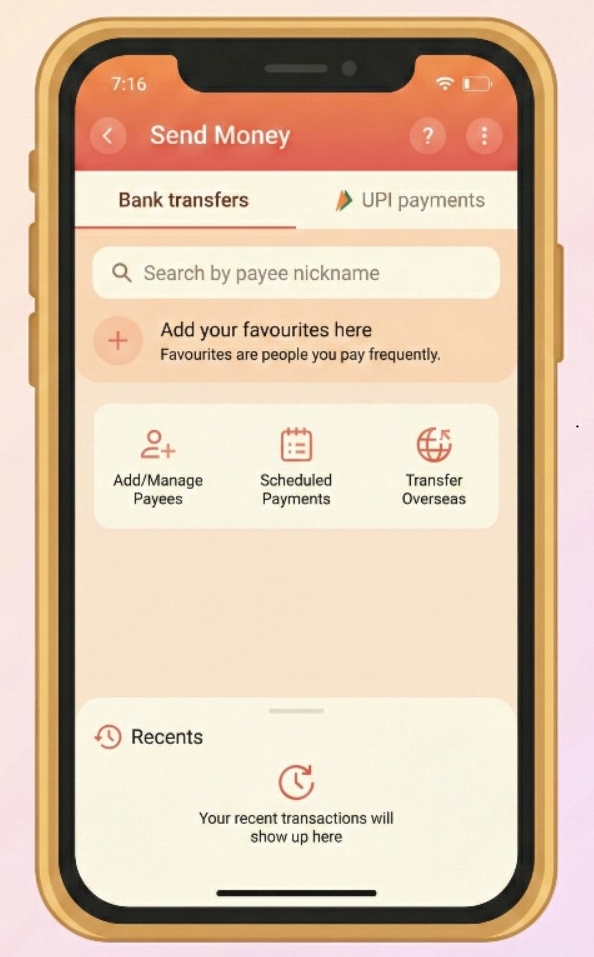
On the Send Money screen, you'll see three main options: Add/Manage Payees, Scheduled Payments, and **Transfer Overseas**.
Tap on **'Transfer Overseas'**. This redirects you to ICICI Bank's Money2World service.
#### **Step 3: Start the Money2World Process**
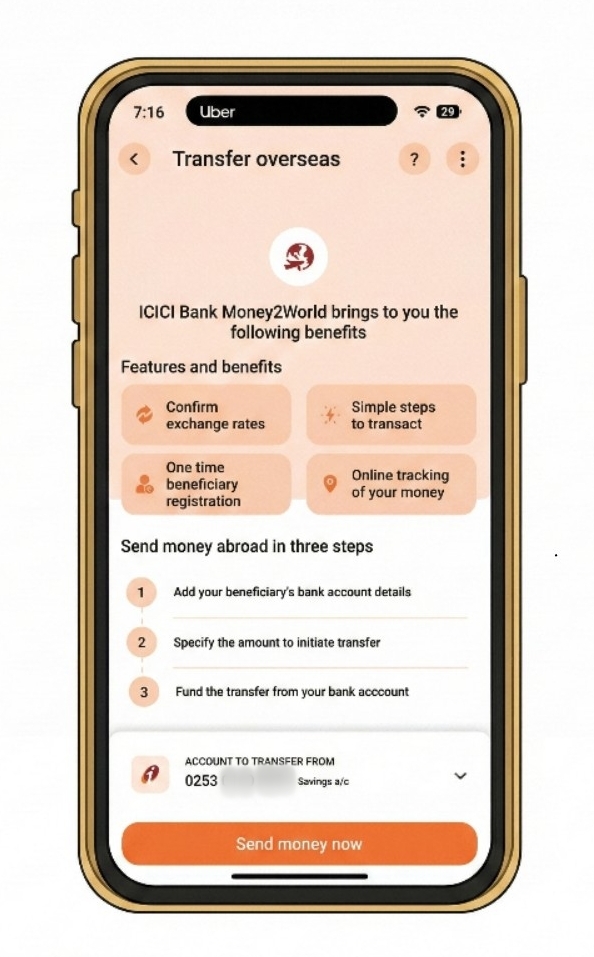
The Money2World welcome screen explains the key benefits: confirmed exchange rates, one-time beneficiary registration, simple steps to transact, and online tracking.
You'll also see your account number from which funds will be debited.
Tap **'Send money now'** to proceed.
👉 **Tip:** Requests submitted before 2 PM IST on working days are processed the same day. After 2 PM or on weekends, they process the next working day.
### **Part B: Entering Transfer Details**
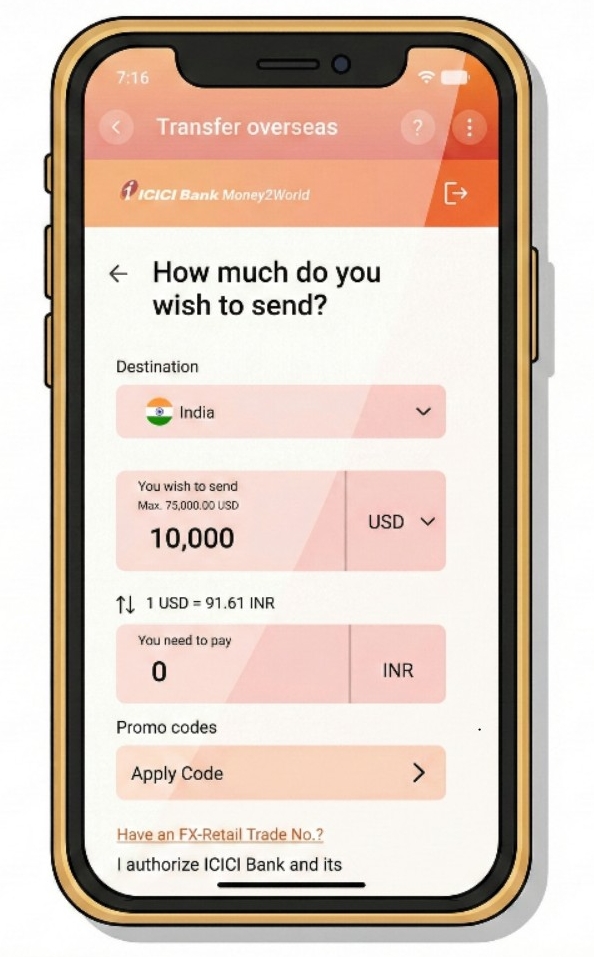
#### **Step 4: Enter the Amount and Select Destination**
Now you'll specify how much you want to send.
- **Destination:** Select India (yes, GIFT City transfers go to India since it's located in Gujarat, though treated as an offshore financial zone)
- **Currency:** Choose USD
- **Amount:** Enter the amount you wish to send
The screen shows the live exchange rate. In our example, 1 USD = 91.61 INR.
You can also apply promo codes if available.
#### **Step 5: Review Exchange Rate and Total Cost**
The app displays a complete breakdown:
- Amount you wish to send (e.g., 45,805 INR)
- Remittance service charge (e.g., 750 INR)
- GST on charges (e.g., 135 INR)
- GST on currency conversion (e.g., 82.44 INR)
- TCS (Tax Collected at Source) if applicable
The total amount to be debited from your account will be shown clearly.
**About TCS:** For transfers above Rs 7 lakh per financial year, TCS of 5% applies (20% for non-educational purposes above Rs 10 lakh). This is refundable when you file your [income tax return](https://getbelong.com/services/nri-tax-filing-india/).
#### **Step 6: Choose the Reason for Transfer**
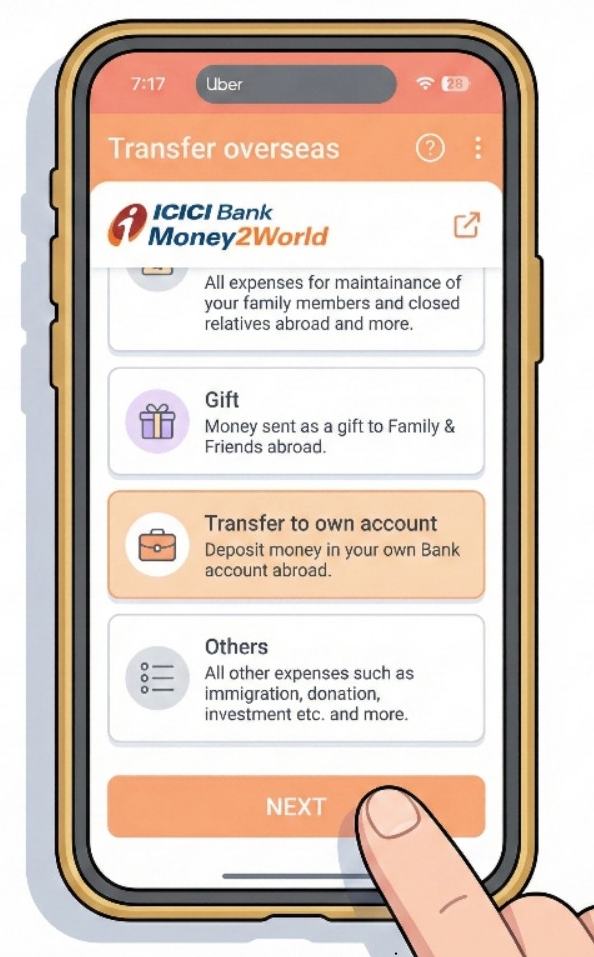
ICICI asks: "What is the reason for your transfer?"
Select **'Transfer to own account'** since you're sending money to your own GIFT City bank account.
Other options include family maintenance, gift, and others. Each has different documentation requirements.
#### **Step 7: Select the Specific Purpose**
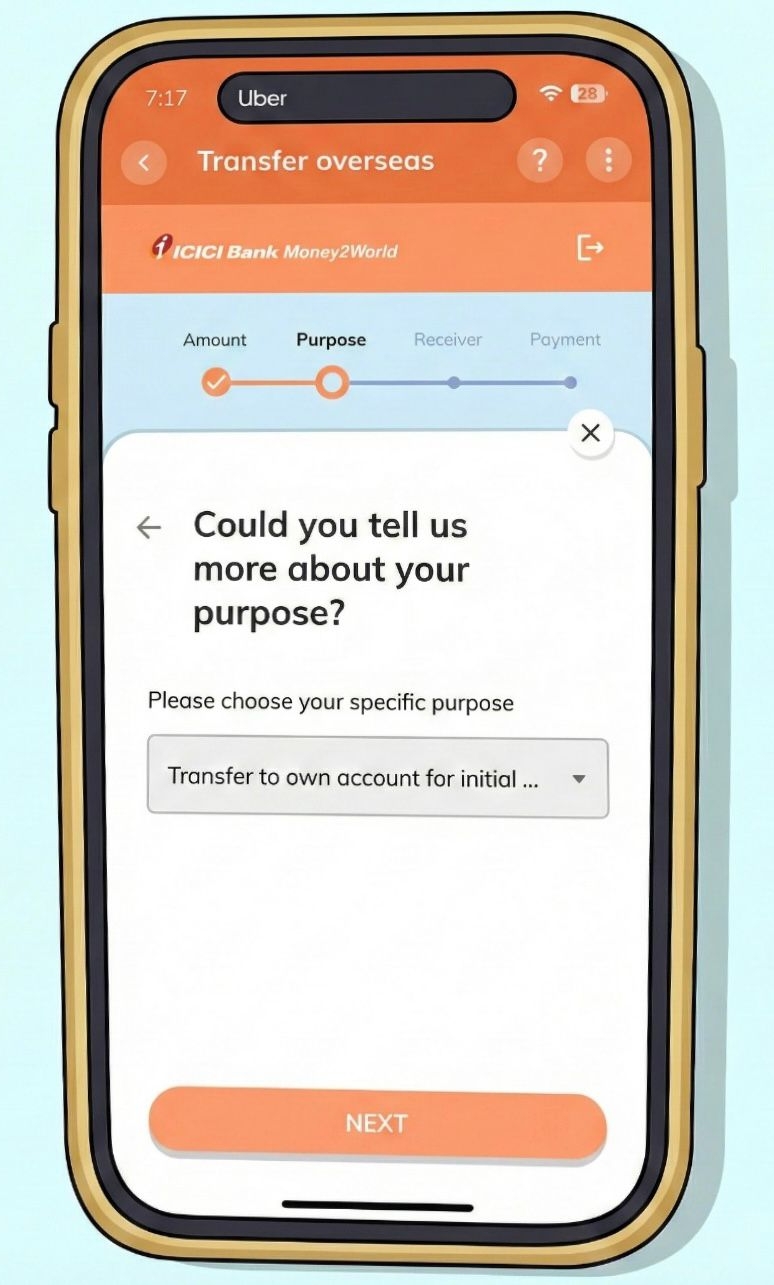
A dropdown appears asking for more details. Select **'Transfer to own account for initial…'** or the appropriate purpose code.
This corresponds to RBI's purpose codes for LRS transactions. For GIFT City investments, this is typically S0023 (Transfer to own bank account overseas).
#### **Step 8: Confirm GIFT City Transfer**
Here's the important part. The app recognizes you're transferring to GIFT City and shows a confirmation popup:
**"Confirm on IFSC GIFT City transfer"**
"This payment will be transferred to IFSC GIFT City in Gandhinagar, Gujarat, India. Would you like to confirm and proceed with the transaction?"
Tap **'CONFIRM'** to continue.
![[Screenshot: GIFT City confirmation popup]](https://prod.superblogcdn.com/site_cuid_clx4a3rx6000caheo10zipfw1/images/8-1768270966351-compressed.jpeg)
👉 **Tip:** This confirmation step is unique to GIFT City transfers. ICICI has specifically enabled this pathway, making transfers smoother than with some other banks.
### **Part C: Adding Receiver Details**
#### **Step 9: Add a New Receiver**
If this is your first transfer, you'll need to add your GIFT City bank account as a receiver.
The app asks: "Who would you be sending this money to?"
Tap **'Add new'** to register your GIFT City account.
![[Screenshot: Add new receiver screen]](https://prod.superblogcdn.com/site_cuid_clx4a3rx6000caheo10zipfw1/images/9-1768270991000-compressed.jpeg)
#### **Step 10: Categorize the Receiver**
Select how to categorize this receiver. Since you're transferring to your own account, choose **'My Bank Account'**.
This tells ICICI that both sender and receiver are the same person, which simplifies documentation.
![[Screenshot: Receiver category selection - My Bank Account]](https://prod.superblogcdn.com/site_cuid_clx4a3rx6000caheo10zipfw1/images/10-1768271015387-compressed.jpeg)
#### **Step 11: Enter Your GIFT City Bank Details**
This is the most critical step. Enter your GIFT City account information accurately:
- **SWIFT Code:** Enter your GIFT City bank's SWIFT code (e.g., RATNINB2XXX for RBL Bank GIFT City)
- **Bank Name:** The system will auto-populate this (e.g., RBL BANK LTD)
- **Branch:** GIFT CITY
- **Country:** India
- **Account Number:** Your GIFT City account number
![[Screenshot: Bank details entry screen]](https://prod.superblogcdn.com/site_cuid_clx4a3rx6000caheo10zipfw1/images/11-1768271038561-compressed.jpeg)
**Common GIFT City Bank SWIFT Codes:**
Bank
SWIFT Code
RBL Bank GIFT City
RATNINB2XXX / RATNINBBGFT
ICICI Bank GIFT City
ICICINAAXXX
Axis Bank GIFT City
AXISINBBGIF
👉 **Tip:** Double-check the SWIFT code! An incorrect code can delay your transfer by days. If you opened your account through [Belong](https://getbelong.com/), you can find these details in the app itself.
#### **Step 12: Intermediary Bank Details (Optional)**
The app asks: "Do you wish to provide Intermediary Bank Details?"
For most GIFT City transfers, select **'NO'**. Direct transfers to GIFT City banks typically don't require an intermediary.
If your GIFT City bank has specifically provided intermediary bank details, select YES and enter them on the next screen.
![[Screenshot: Intermediary bank popup]](https://prod.superblogcdn.com/site_cuid_clx4a3rx6000caheo10zipfw1/images/12-1768271067555-compressed.jpeg)
#### **Step 13: Add Intermediary Bank Details (If Required)**
If you selected YES, enter the intermediary bank's SWIFT code, name, and address.
Most NRIs transferring to major GIFT City banks can skip this step.
![[Screenshot: Intermediary bank details entry]](https://prod.superblogcdn.com/site_cuid_clx4a3rx6000caheo10zipfw1/images/13-1768271089236-compressed.jpeg)
#### **Step 14: Enter Receiver Address**
Provide the receiver's address. Since you're the receiver, enter your own address as registered with the GIFT City bank.
- **Country:** India
- **Address:** Your address (e.g., your residential address in India or the GIFT City bank's address)
- **Zip code:** Enter the appropriate pin code
![[Screenshot: Receiver address entry]](https://prod.superblogcdn.com/site_cuid_clx4a3rx6000caheo10zipfw1/images/14-1768271110819-compressed.jpeg)
#### **Step 15: Verify with OTP**
ICICI Bank sends a 6-digit verification code to your registered mobile number.
Enter the OTP to confirm adding the new receiver. The code expires in about 2 minutes.
This security step ensures only you can add beneficiaries to your account.
![[Screenshot: OTP verification screen]](https://prod.superblogcdn.com/site_cuid_clx4a3rx6000caheo10zipfw1/images/15-1768271133007-compressed.jpeg)
### **Part D: Completing the Transfer**
#### **Step 16: Specify the Source of Money**
An important compliance step. Select where your money is coming from:
- Salary/Savings
- Business income
- Sale of assets
- Gift/Inheritance
The screen shows an important note about TCS: "TCS (Tax collected at source) of 20% would be applied to all international remittances over a threshold of Rs 10 lakh made within a fiscal year."
Select your applicable source and proceed.
![[Screenshot: Final payment confirmation with OTP]](https://prod.superblogcdn.com/site_cuid_clx4a3rx6000caheo10zipfw1/images/16-1768271213445-compressed.jpeg)
#### **Step 17: Final Confirmation and Payment**
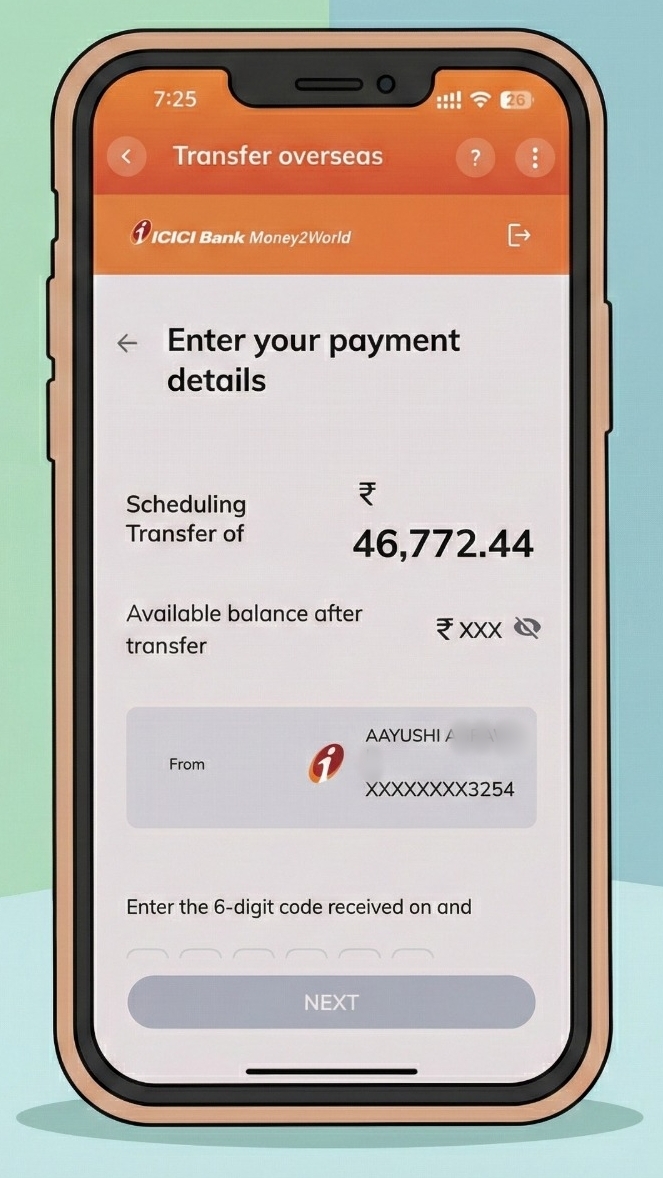
Review all details one last time:
- Transfer amount in INR
- Available balance after transfer
- Source account details
Enter the 6-digit OTP received on your registered mobile/email to authorize the payment.
![[Screenshot: Source of money selection with TCS note]](https://prod.superblogcdn.com/site_cuid_clx4a3rx6000caheo10zipfw1/images/16-1768271164548-compressed.jpeg)
#### **Step 18: Transfer Initiated**
Once you confirm, the transfer is initiated. ICICI Bank will:
- Debit the total amount from your account
- Convert INR to USD at the locked exchange rate
- Send the funds via SWIFT to your GIFT City account
You'll receive an email with the SWIFT reference number for tracking.
**Expected Timeline:** Funds typically reach your GIFT City account within 1-3 working days.
## **Understanding the Costs**
Here's a breakdown of what you'll pay for an ICICI to GIFT City transfer:
Cost Component
Amount
Remittance Service Charge
₹500-750 + GST
Currency Conversion Margin
Built into exchange rate
Correspondent Bank Charges
Usually nil for GIFT City
TCS (if applicable)
5-20% above ₹7 lakh/year
The TCS is not an extra cost. It's an advance tax collection that you can claim as a credit when [filing your ITR](https://getbelong.com/blog/nri-taxation-guide-dtaa-benefits-itr-filing/).
👉 **Tip:** Check if ICICI is running any promotional offers. They occasionally waive service charges for Money2World transfers.
## **Why Transfer to GIFT City? The Real Advantage**
Let me share why many NRIs in our community are moving funds to [GIFT City](https://getbelong.com/blog/gift-city-india/):
Feature
NRE FD (Rupee)
GIFT City USD FD
Currency
INR
USD
Interest Rate
6.5-7.5%
4.5-5.5%
TDS in India
Tax-free for NRIs
Tax-free
Currency Risk
Exposed to depreciation
Protected
Repatriation
Fully repatriable
Fully repatriable
The rupee has depreciated roughly 4-5% annually against the dollar over the past decade. With a [GIFT City USD FD](https://getbelong.com/tools/nri-fd-rates/), you earn interest AND benefit from this trend when you convert back to rupees.
Use [Belong's Rupee vs Dollar Tracker](https://getbelong.com/tools/rupee-vs-dollar-tracker/) to see historical currency trends before deciding.
## **What Happens After the Transfer?**
Once your transfer is processed:
1. **Tracking:** Check transfer status in Money2World under 'View Details'
2. **Confirmation:** ICICI sends an email when funds reach the beneficiary
3. **In GIFT City:** Log into your GIFT City bank account to verify receipt
4. **Book FD:** Once funds arrive, you can book a USD Fixed Deposit
If you opened your GIFT City account through [Belong](https://getbelong.com/), you can track your balance and book FDs directly through our app.
## **Troubleshooting Common Issues**
**Transfer stuck in processing?** Check if all KYC documents are in order. ICICI may request additional verification for first-time large transfers.
**Wrong SWIFT code entered?** Contact ICICI customer care immediately. They may be able to recall the transfer if it hasn't been processed.
**TCS deducted but you're an NRI?** TCS rules apply based on your residential status in the source bank's records. Ensure your [NRI status](https://getbelong.com/blog/nri-status/) is properly updated with ICICI. You can claim TCS refund when filing returns.
**Transfer amount different from what you entered?** Exchange rates fluctuate. The final credited amount depends on the rate at the time of processing, not when you initiated the transfer.
## **Ready to Start Your GIFT City Investment?**
Transferring from ICICI Bank to GIFT City is straightforward once you know the steps. The Money2World feature handles the regulatory compliance, and GIFT City's special status means your funds arrive in a tax-efficient offshore zone within India.
My suggestion: start with a smaller amount to test the process. Once you're comfortable, scale up. That's what many NRIs in our community did before making larger transfers.
**Need help opening a GIFT City account?** [Download the Belong app](https://app.getbelong.com/LywZ/blogs) to get started with our partner banks. We handle the KYC and setup digitally. Plus, use our free [NRI FD comparison tool](https://getbelong.com/tools/nri-fd-rates/) to find the best rates across [NRE, NRO, FCNR, and GIFT City deposits](https://getbelong.com/blog/gift-city-fd-vs-fcnr-vs-nro-and-nre-fds/).
Have questions about GIFT City transfers? [Join our WhatsApp community](https://chat.whatsapp.com/EaxmhRZ6fTiChXQAZhqFK4) where many NRIs share their experiences and get answers from our team.
## **Sources**
- [ICICI Bank - Money2World Outward Remittance](https://www.icicibank.com/personal-banking/online-services/funds-transfer/outward-remittance/online-transfer/internet-banking)
- [ICICI Bank - Outward Remittance FAQs](https://www.icici.bank.in/personal-banking/accounts/outward-remittance/outward-remittance-faqs)
- [ICICI Bank GIFT City FAQs](https://www.giftcity.icici.bank.in/giftcity/faqs)
- [RBI - Liberalised Remittance Scheme Guidelines](https://www.rbi.org.in/scripts/FAQView.aspx?Id=115)
- [IFSCA - Banking Regulations](https://ifsca.gov.in/)
## **Related Articles**
- [GIFT City Fixed Deposits for NRIs](https://getbelong.com/blog/nri-fixed-deposits-in-gift-city/)
- [GIFT City vs NRE/NRO/FCNR: Which FD is Right for You?](https://getbelong.com/blog/gift-city-fd-vs-fcnr-vs-nro-and-nre-fds/)
- [Best NRI Fixed Deposit Rates](https://getbelong.com/blog/best-nri-fixed-deposit-rates/)
- [GIFT City Tax Benefits for NRIs](https://getbelong.com/blog/gift-city-tax-benefits/)
- [How to Invest in India from UAE](https://getbelong.com/blog/invest-india-uae/)
- [Transfer Money from IDFC First Bank to GIFT City](https://getbelong.com/blog/transfer-money-from-idfc-first-bank-to-gift-city/)
- [ICICI Bank for NRIs in UAE](https://getbelong.com/blog/icici-nri-bank-in-uae/)
- [Best Banks for NRI Accounts](https://getbelong.com/blog/best-banks-for-nri-accounts/)
- [NRI Account Types Explained](https://getbelong.com/blog/nri-account-types/)
- [Repatriable vs Non-Repatriable NRI FDs](https://getbelong.com/blog/repatriable-vs-non-repatriable-nri-fds/)
## FAQs
Q: How long does the transfer take?
A: Typically 1-3 working days. Requests submitted before 3 PM IST on working days are processed the same day. IDFC's SWIFT GPI tracking lets you monitor exactly where your money is.
Q: Can I transfer from my NRE account to GIFT City through IDFC First Bank?
A: Yes. NRIs can transfer from both NRE and regular savings accounts. For NRE account transfers, no additional documents are required. The 'Pay Abroad' feature works seamlessly for both account types.
Q: What are the transfer limits?
A: Under RBI's Liberalised Remittance Scheme (LRS), resident Indians can transfer up to USD 250,000 per financial year. For newly added beneficiaries, there's a 24-hour cooling period with a limit of ₹2,50,000. After that, regular limits apply.
Q: Are there any hidden charges?
A: IDFC First Bank charges zero processing fees for Pay Abroad transactions. However, correspondent banks involved in the SWIFT transfer may levy charges (usually $15-25). TCS is applicable on remittances above ₹7 lakh per year, but it's refundable when you file ITR.
Q: I don't have an IDFC First Bank account. Can I still transfer to GIFT City?
A: Yes! Most major banks offer similar international remittance features. Check our guides for SBI, HDFC, ICICI, and Axis Bank transfers to GIFT City. Or you can open an IDFC First Bank account online - they have a fully digital account opening process.
---
This blog is powered by Superblog. Visit https://superblog.ai to know more.
---