How to Transfer Money from IDFC First Bank to GIFT City - Step-by-Step Guide

You've heard about GIFT City's tax-free USD fixed deposits. The returns sound attractive - 5% or more in dollars, with zero TDS.
But here's where most NRIs get stuck: actually sending the money.
If you have an IDFC First Bank account (savings or NRE), you're in luck. Their 'Pay Abroad' feature makes transfers to GIFT City surprisingly simple.
At Belong, we've walked dozens of NRIs through this process, and what used to take branch visits and paperwork now happens in 10 minutes on your phone.
This guide shows you exactly how to do it - with real screenshots from the IDFC First Bank app.
What You'll Need Before Starting
- IDFC First Bank mobile app (latest version)
- Active savings or NRE account with IDFC First Bank
- Your GIFT City bank account details (account number, SWIFT code, branch address)
- PAN card linked to your IDFC account (mandatory for LRS transactions)
- Mobile number registered with the bank for OTP verification
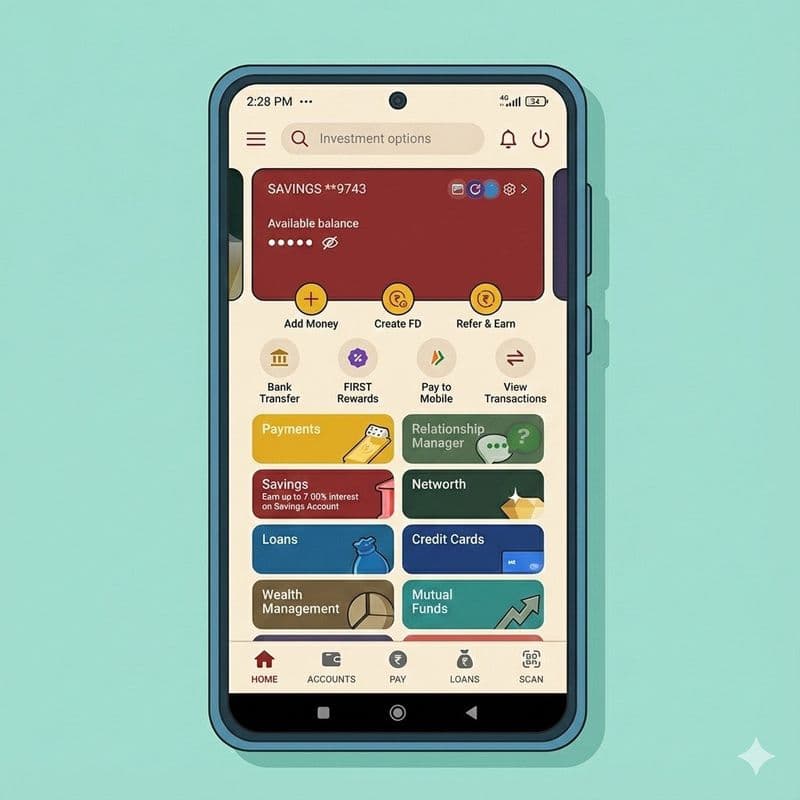
Part A: Adding Your GIFT City Account as a Payee
Before you can transfer money, you need to register your GIFT City bank account as a beneficiary. This is a one-time setup - once done, future transfers take just 2 minutes.
Step 1: Open the IDFC First Bank App and Navigate to 'Pay Abroad'
Log into your IDFC First Bank mobile app. On the home screen, look for the 'Pay' section. You'll see several options - tap on 'Pay abroad'.
This opens IDFC's international remittance feature, which works under RBI's Liberalised Remittance Scheme (LRS). You can send up to USD 250,000 per financial year through this channel.
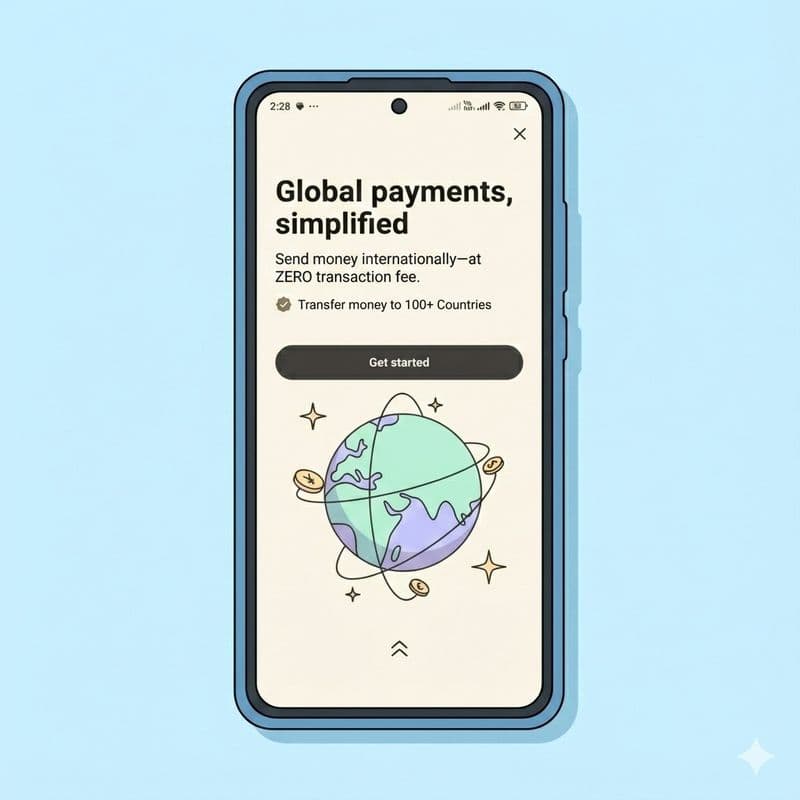
Step 2: Get Started with the 'Pay Abroad' Feature
IDFC First Bank will show you an introduction screen explaining their global payments service. Key highlights:
- Zero transaction fees from IDFC's end
- Transfer to 100+ countries
- SWIFT GPI tracking for real-time updates
Tap 'Get Started' to begin adding your GIFT City account.
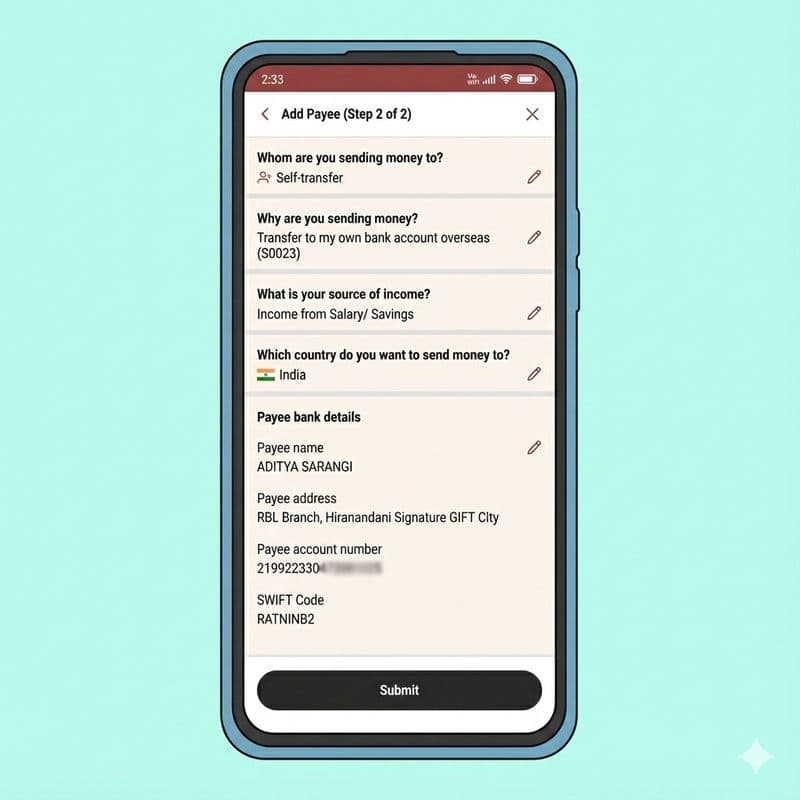
Step 3: Select 'Self-Transfer' as Recipient Type
The app asks: "Whom are you sending money to?"
For GIFT City investments, select 'Self-transfer' - because you're sending money to your own account at a GIFT City bank.
Other options like 'Someone else' or 'Business' are for different purposes like family maintenance or vendor payments.
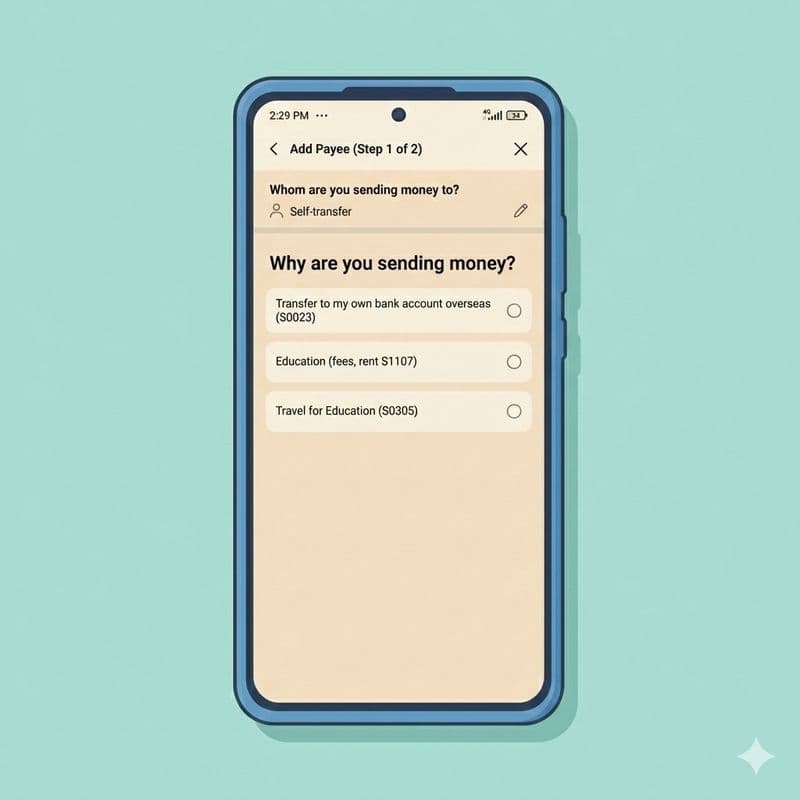
Step 4: Choose the Purpose of Transfer
Select 'Transfer to my own bank account overseas (S0023)' from the options.
This purpose code (S0023) is specifically for transferring funds to your own foreign currency account. Since GIFT City operates as an International Financial Services Centre, transfers there are treated as overseas transactions under FEMA regulations.
Step 5: Declare Your Source of Income
The app asks about your income source. Options include:
- Income from Salary/Savings
- Income from Business/Rent
- Income from Property
- Gifts/Inheritance from Friends/Relatives
Select the option that accurately describes where your funds come from. Most salaried professionals choose 'Income from Salary/Savings'.
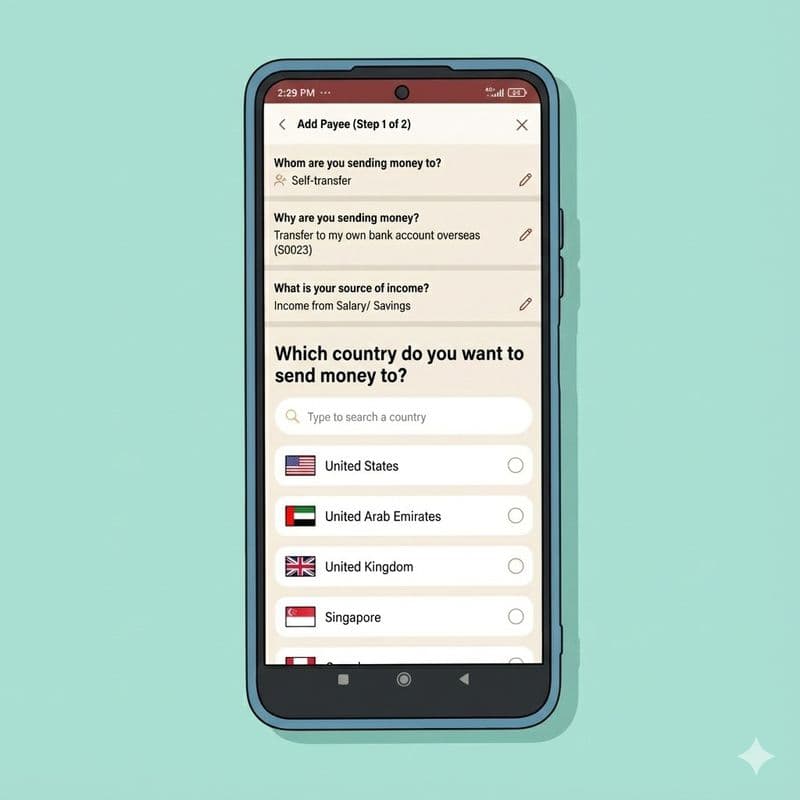
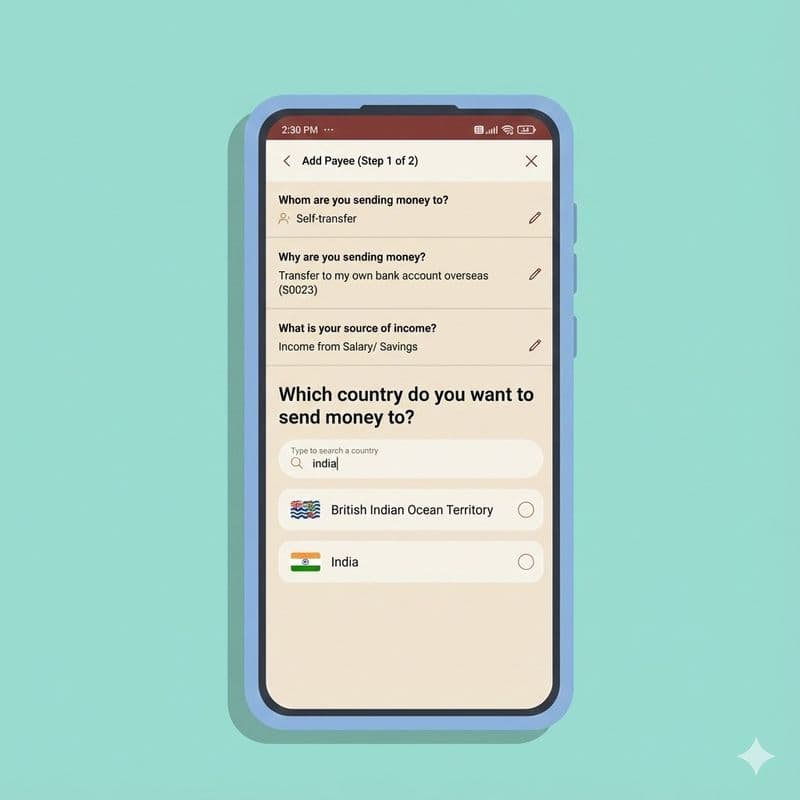
Step 6: Select India as the Destination Country
Here's where it gets interesting. You need to select 'India' as the destination country.
"Wait, India? But I'm already in India!" - I hear this a lot.
You might be in India or overseas as NRI. The final destination is GIFT City.
GIFT City operates as a Special Economic Zone with 'deemed foreign territory' status. Transfers to GIFT City banks are technically international transactions, but the beneficiary country is still India. The app's country list includes India for exactly this scenario.
Type 'India' in the search bar and select it.
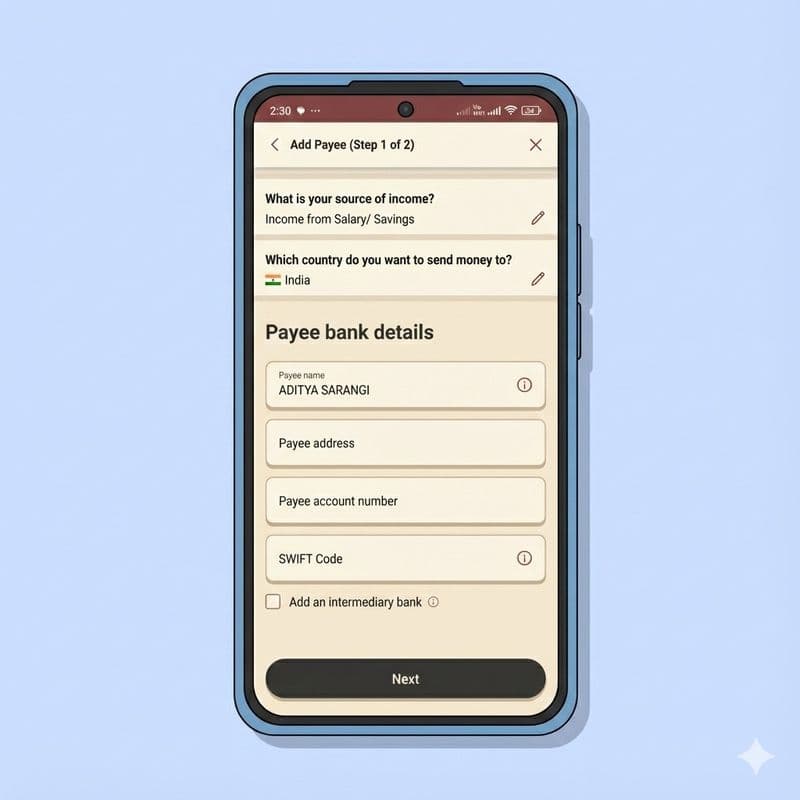
Step 7: Enter Your GIFT City Bank Account Details
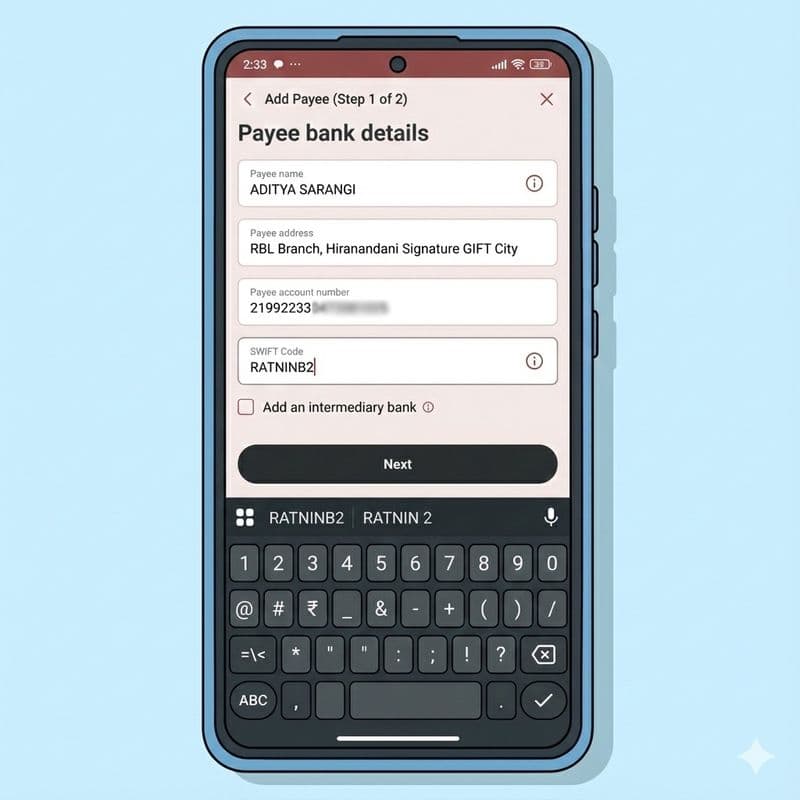
This is the critical step. You need to enter your GIFT City bank account information accurately:
- Payee Name: Your name exactly as it appears on your GIFT City account
- Payee Address: The GIFT City branch address (e.g., 'RBL Branch, Hiranandani Signature GIFT City')
- Account Number: Your GIFT City bank account number
- SWIFT Code: The bank's SWIFT/BIC code for GIFT City (e.g., RATNINB2 for RBL Bank GIFT City)
👉 Tip: Double-check the SWIFT code! An incorrect code can delay your transfer by days. If you open your account through Belong, you can see these details on the Belong app itself.
Common GIFT City Bank SWIFT Codes
Bank (GIFT City IBU) | SWIFT Code |
|---|---|
RBL Bank GIFT City | RATNINB2 |
ABORINBBGIF | |
ABORINBBGIF | |
HABORINBBGIF |
Step 8: Review and Submit Payee Details
The app shows a summary of all the information you've entered:
- Whom you're sending to (Self-transfer)
- Purpose (Transfer to own bank account overseas)
- Source of income
- Destination country (India)
- Complete bank details
Verify everything is correct, then tap 'Submit'.
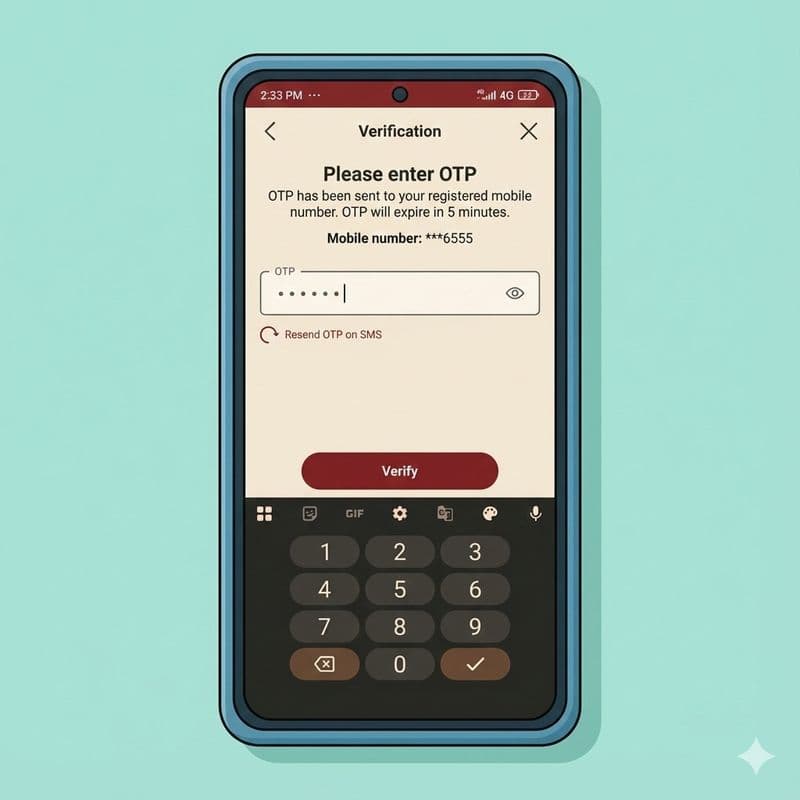
Step 9: Complete OTP Verification
For security, IDFC First Bank sends a One-Time Password (OTP) to your registered mobile number. Enter the 6-digit code to verify your identity.
The OTP expires in 5 minutes. If you don't receive it, tap 'Resend OTP on SMS'.
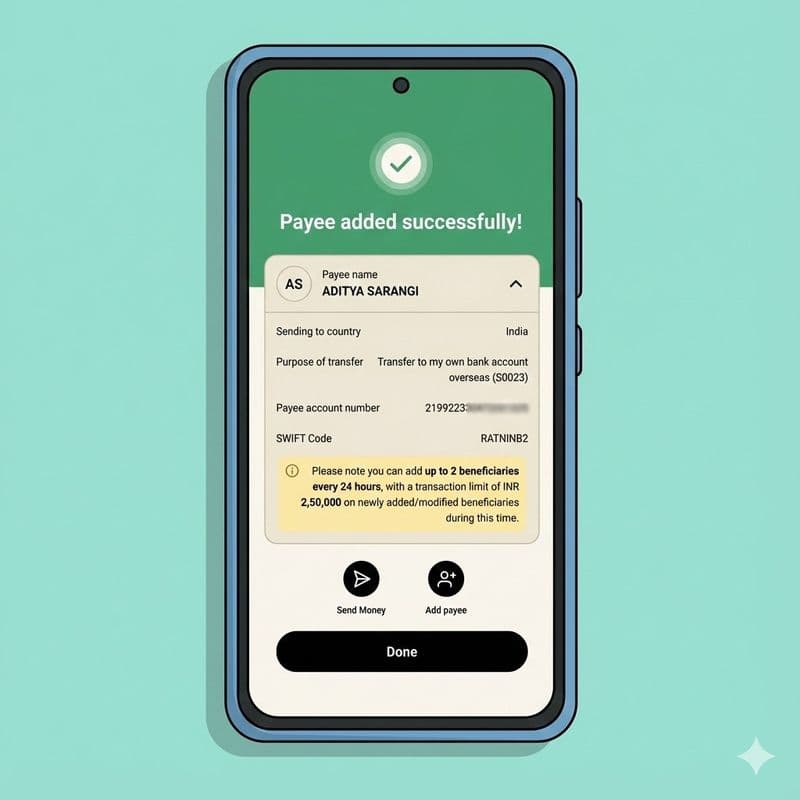
Step 10: Payee Added Successfully
Once verified, you'll see a confirmation screen: "Payee added successfully!"
The screen shows all your payee details for reference. Important note: You can add up to 2 beneficiaries every 24 hours, with a transaction limit of INR 2,50,000 on newly added beneficiaries during this cooling period.
From here, you can either:
- Tap 'Send Money' to transfer funds immediately
- Tap 'Done' and transfer later
Part B: Transferring Money to Your GIFT City Account
With your payee set up, transferring funds takes just a few taps.
Step 11: Enter the Transfer Amount
Go to Pay Abroad and select your GIFT City payee. The app shows a 'Fund Transfer' screen where you enter:
- Amount in USD: How much you want your GIFT City account to receive
- Amount in INR: The rupee equivalent that will be debited from your account
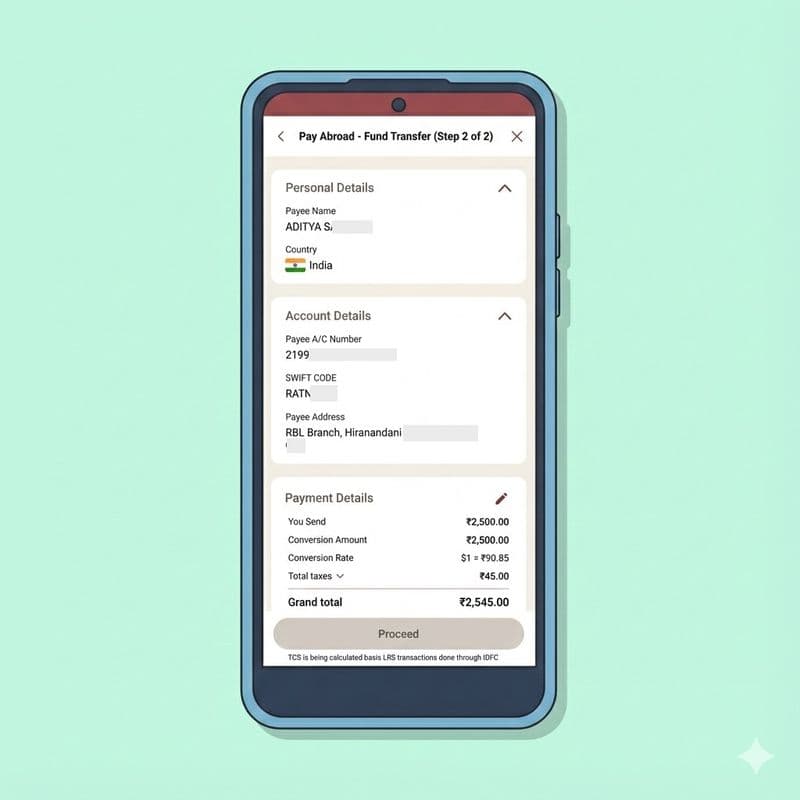
The app displays the live conversion rate (locked for 72 hours once you proceed). In this example, the rate is $1 = ₹90.85.
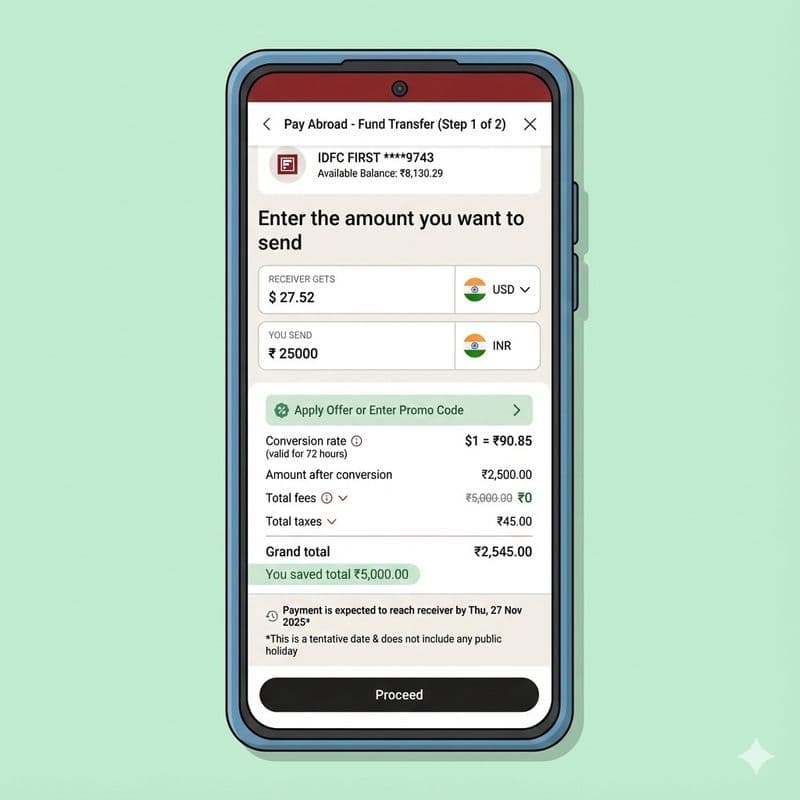
Step 12: Review Fees and Savings
IDFC First Bank often runs promotions with zero transfer fees. In this example:
- Transfer amount: ₹25,000 (converting to ~$27.52)
- Total fees: ₹0 (regular fee of ₹5,000 waived)
- TCS (Tax Collected at Source): ₹45
- Grand total debited: ₹2,545
The banner shows: "You saved total ₹5,000.00" - that's real savings on transfer fees.
📌 About TCS:Tax Collected at Source (TCS) is applicable on LRS remittances above ₹7 lakh per financial year (5% rate for most purposes). This TCS is refundable when you file your income tax return, so it's not an extra cost - just an advance tax collection.
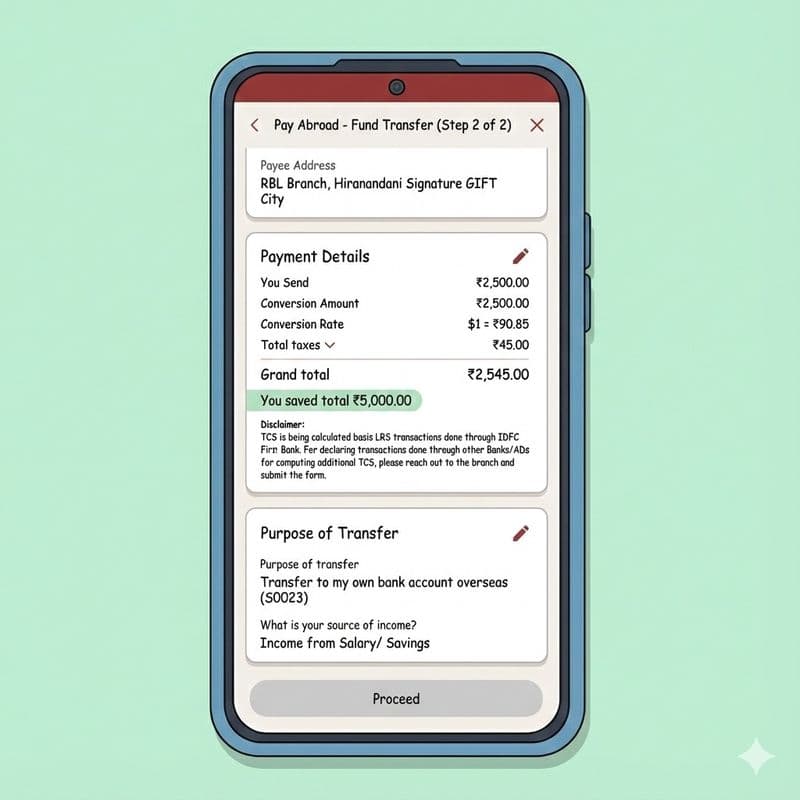
Step 13: Confirm Payment Details and Complete Transfer
The final screen shows complete payment details:
- Personal details (your name, country)
- Account details (GIFT City bank, account number, SWIFT code)
- Payment breakdown (conversion rate, fees, TCS, grand total)
- Purpose of transfer
Check the box to agree to Terms and Conditions, then tap 'Proceed' to complete the transfer.
Expected delivery: Funds typically reach your GIFT City account within 1-3 working days. IDFC's SWIFT GPI tracking lets you monitor the transfer status in real-time through the app.
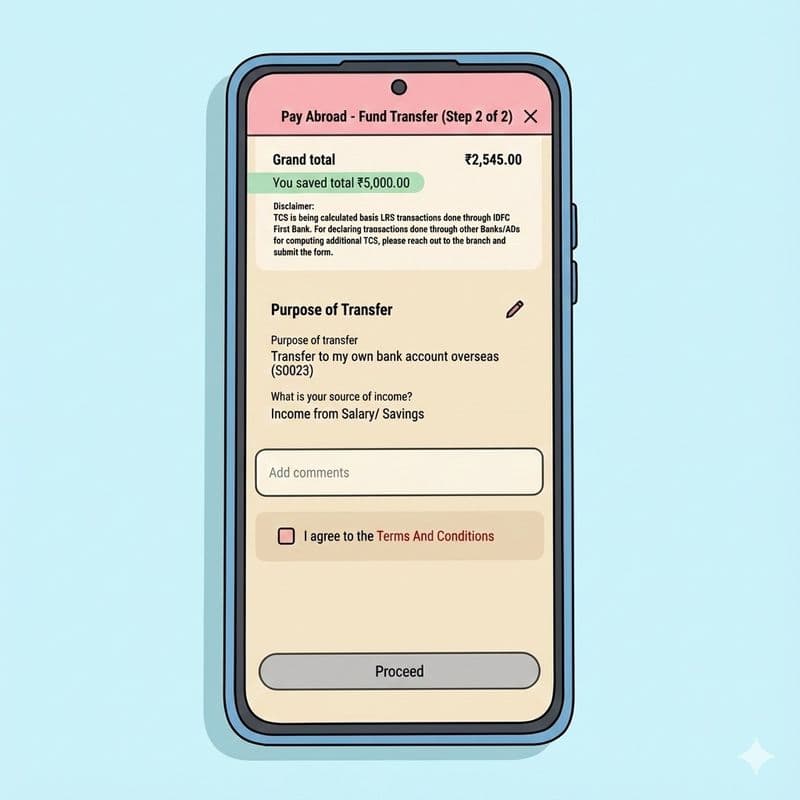
What Happens After You Transfer?
Once your transfer is processed:
- You'll receive an email with the SWIFT confirmation
- Track the transfer status through 'Pay Abroad' → 'Transactions'
- Funds land in your GIFT City account in USD
- You can then book a USD Fixed Deposit earning 4.5-5%+ interest, completely tax-free in India
Why Transfer to GIFT City? The Numbers Make Sense
Let me share a quick comparison I often show clients:
Feature | NRE FD (Rupee) | GIFT City USD FD |
|---|---|---|
Currency | INR | USD ✓ |
Interest Rate | 6.5-7.5% | 4.5-5.5% |
TDS in India | Tax-free for NRIs | Tax-free ✓ |
Currency Risk | Exposed to INR depreciation | Protected (USD) ✓ |
Repatriation | Fully repatriable | Fully repatriable ✓ |
The real advantage? Rupee has depreciated 4-5% annually against the dollar over the past decade. With a USD FD, you earn interest AND benefit from this depreciation when you eventually convert back.
👉 Pro Tip: Use Belong's Rupee vs Dollar Tracker to see historical currency trends and make informed decisions about timing your transfers.
Ready to Start Your GIFT City Investment Journey?
Transferring money to GIFT City doesn't have to be complicated. With IDFC First Bank's Pay Abroad feature, you can move funds in under 10 minutes - no branch visits, no paperwork, no hassle.
Here's my suggestion: start with a small amount to test the process. Once you're comfortable, you can scale up. That's exactly what I did when I made my first GIFT City investment, and I've never looked back.
Need help opening a GIFT City account?
Download the Belong app to get started with our partner banks. We handle the KYC, paperwork, and setup - you just provide the documents. Plus, use our free NRI FD comparison tool to find the best rates across NRE, NRO, FCNR, and GIFT City deposits.
Disclaimer: Screenshots provided are for reference sake. Actual bank/mobile interface might be different. Please use the graphics as directions.
Sources
- IDFC First Bank - Outward Remittance for NRIs
- IDFC First Bank - Pay Abroad Feature
- RBI - Liberalised Remittance Scheme Guidelines
- IFSCA - GIFT City Banking Regulations
Related Articles:

Comments
Your comment has been submitted